
PACE spoke about code signing at the 2024 droidcon London conference. While the talk focused on the Android platform, the key takeaways were applicable to software developers targeting any modern operating system.
All Android apps must be code signed to run on a device. This is performed either directly by the developer or through Play app signing. Despite every app needing to be code signed, the processes around it are increasingly abstracted away from the developer. This has resulted in code signing becoming shrouded in mystery.
Most modern operating systems use code signatures. These are a cryptographic hash of the software binary and other assets that make up the application. The signature is embedded in the application and is verified by the operating system during installation or launch.
Verification checks whether the binary or the assets have been modified since the app was signed. Only if they have not been modified is the signature valid.
Android won’t install an app without a valid signature.
Signing identifies the last person to modify the app. Usually, that’s the developer. However, it could also be a separate release team or someone trying to hack the app.
Android doesn’t act as a certificate authority or keep a list of valid certificates. It is perfectly valid to use a self-signed certificate.
The Android operating system uses the signature to imply ownership of the app once it’s installed. Responsibility falls on the last person who touched it.
Firstly, you can’t upgrade an app if the certificate changes. So this gives the user some confidence that version 2 has come from the same developer as version 1. This gives some defense against phishing attacks that tempt users to install a “special” version of an app. Often these special versions are trojans for delivering malware.
Secondly, the signing certificate is used when defining the sandboxing for each app installed on a phone. In practice, that means it is easier to have two apps talk to each other if they were signed with the same certificate. That allows the developer to make choices about how their apps interact, but another developer can’t easily break down the sandboxes without resorting to hacking techniques.
Historically, the process of signing an Android app (the APK) for publication was fairly straightforward.
Android Studio even simplifies the process and signs the APKs for the developer; either quietly when pushing builds to phones for testing during development, or when explicitly asked to create a signed APK.
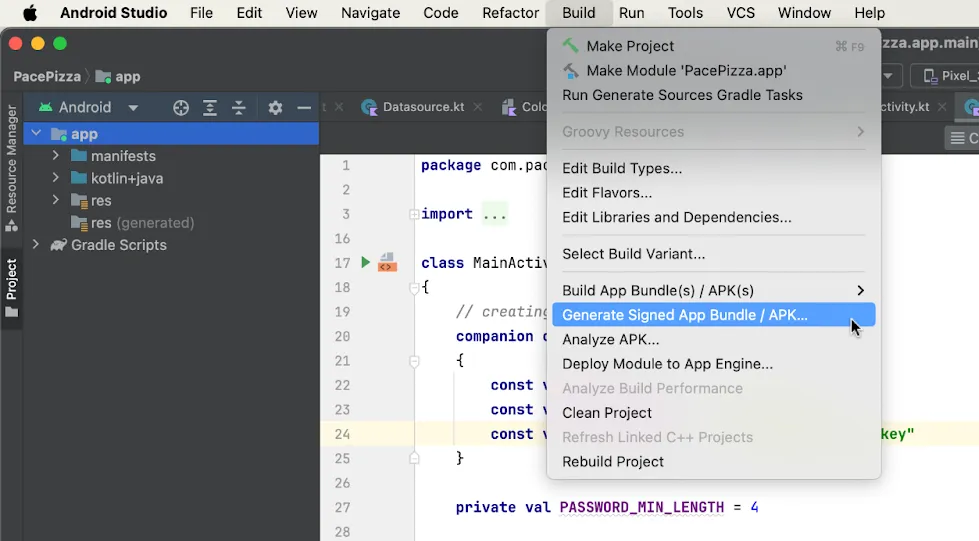
Since that process was developed, the Android developer ecosystem has evolved. Firstly, developers don’t upload APKs to Google anymore. App Bundles (AABs) are uploaded instead. Secondly, Play app signing (“Play signing” for short) was rolled out.
With Play signing, Google re-signs the app before delivering it to users. So the APK the user receives isn’t signed by the developer’s key, but by a key that Google manages on the developer’s behalf. In 90% of cases, this key was even created by Google.
The key the developer originally signed with is now called the “upload” key. The APK signed with this key is still valid for local testing.

A lot of developers don’t realise that re-signing is happening in the background. But if Play signing is enabled, then Google is re-signing the app.
In fairness, the developer console has improved at explaining the developer’s choices. There was a period when Play signing was forced on for all new apps.

Having Google manage the keys is usually beneficial; and having the app re-signed doesn’t typically cause any problems. However, if the developer is relying on the signing certificate for anything, then they need to accommodate this re-signing. Common dependencies on the signing certificate are for security reasons, e.g., to make sure the app isn’t being re-signed by a hacker.
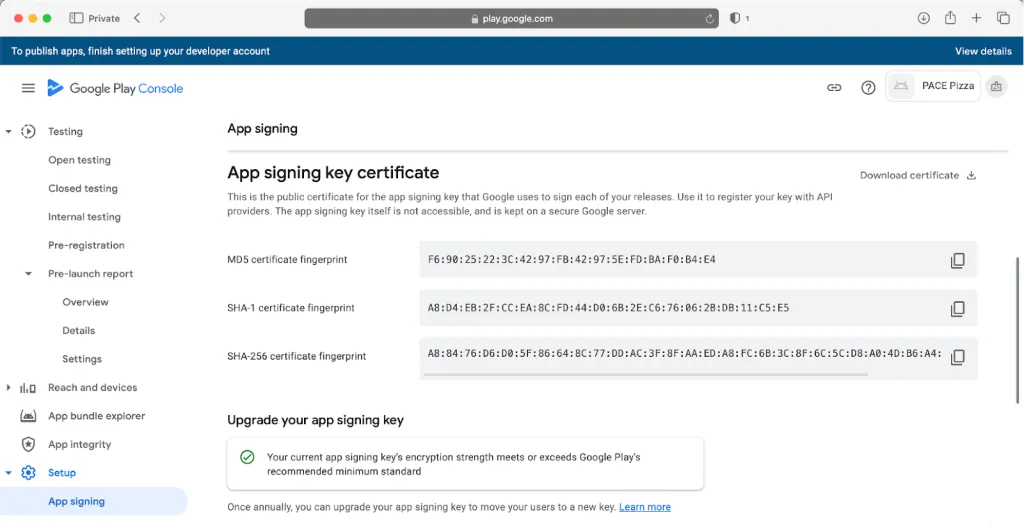
If the developer needs details of the signing certificate Google is using, they can find it in their Play account.
What about AABs? An AAB is a bundle of assets that Google uses to create tailored APKs for different devices. If Google is creating the APKs, then Play signing means that Google has the ability to sign them too.
There’s a common misconception that just because code is signed, it is secure. That is not the case.
Firstly, anyone with access to the freely downloadable developer tools can re-sign your code, using the same process as the original developer and overwriting the original signature.
Secondly, code signing does not protect your code from modification or reverse engineering. Signed or not, a hacker can open the app in static analysis tools. Because the app can be re-signed, it is easy for a hacker to take control to make modifications or dynamically analyse the code.

Platforms (like Android) implement code signing to protect the broader ecosystem, not the individual apps within the ecosystem. Android uses code signing to define the boundaries of the sandboxes—limiting the reach of bad actors.
Some platforms go further, using code signing to allow only trusted developers to deploy apps or modules in the first place. This is a use case supported by PACE’s code signing platform, which is a PKI-based solution for code signing and validation.
Code signing does not stop someone from reverse engineering your code or finding secrets within it. Developers must take responsibility for code protection:
Every app in the Android ecosystem must be signed to be installed on a phone, although this process is often abstracted away from the developer. Code signing protects the Android ecosystem—not the individual app developer.
Developers who store sensitive data or algorithms in their apps need additional measures, such as PACE’s White-box Works tool, which provides strong protection to stop software algorithms from being reverse engineered and cryptographic secrets from being exposed.
To learn more about using white-box cryptography in your software, contact PACE to talk with our experts.